


Here’s the thing about email signatures. Everyone has one. Name, job title, website, socials. Blah blah blah, right?!
Completely overlook-able.
It just sits at the bottom of every single email you send (dozens a week, hundreds a month, thousands a year) and it does absolutely nothing except confirm you exist.
That’s an enormous amount of real estate you’re already paying for and not using.
So let’s use it. Below are three real email signature P.S. examples, then a step-by-step way to write your own in about ten minutes. You set it up once, and it works on every email you send from then on.
Three email signature P.S. examples
I stole this idea from one of my RevenueOS clients (with her permission, of course). Here are three P.S. lines that each do a completely different job.
1. “I’m legit, here’s the proof” (my client’s):
“P.S. I was recently featured as a Member Profile in the April 2026 issue of Avionics News (pg. 54) if you’d like more background.”
Subtle. Authoritative without being braggy. Curiosity-driven without being click-baity. A humble brag.
2. “I know exactly who you are” (mine):
“P.S. If you’re the kind of woman who’s good at one-on-one connection but cannot fathom ‘working a room’… this one’s for you.”
That links to an Instagram reel. Six seconds. It does more to explain who I am and who I’m for than my entire website homepage.
3. “I know exactly what’s wrong” (a web developer in our community who builds custom membership and e-commerce sites):
“P.S. If you have a membership but are living in a constant state of frustration with your business tech… this is one story you won’t want to miss.”
It doesn’t describe her services. It describes a feeling (a very specific feeling), and anyone currently living in that exact state of frustration is going to click before they finish reading it.
There’s no single right formula. There’s just the question of what you’d most want someone to know about you, and what one piece of content says it best.
How to write your email signature P.S., step by step
Step 1: Pick the one job it does (2 minutes)
Ask yourself which of these your ideal client most needs to believe before she’ll work with you:
- That you’re legit. Pick the proof P.S. Good if you’re new to her, or in a field where credentials matter.
- That you get her. Pick the “who you are” P.S. Good if you’re one of many people who do what you do.
- That you know what’s wrong. Pick the “what’s wrong” P.S. Good if your client feels a specific, nameable frustration.
One job only. A P.S. that tries to do all three does none of them.
Step 2: Pick one thing to link to (2 minutes)
Fair warning, most folks get this wrong…
Do not link to your website. Do not link to your LinkedIn profile. Your signature already has those. That’s what the rest of it is for.
The P.S. should point to one specific thing someone can consume in under a minute and immediately understand you:
- A reel.
- A short article.
- A case study.
- A testimonial with a zinger of a line in it.
- A podcast episode you were on that gets right to the point.
Not “here’s where I live on the internet.” One thing that makes them go “oh… her.”
Step 3: Write the line (3 minutes)
Use the formula for the job you picked, and link the last few words:
- Proof: “P.S. [Business] was recently featured in [publication] if you’d like more background.”
- Who you are: “P.S. If you’re the kind of [person] who [what she’s good at] but [what she struggles with]… this one’s for you.”
- What’s wrong: “P.S. If you’re [her situation] and living in a constant state of [feeling]… this is one story you won’t want to miss.”
Step 4: Read it as your ideal client (1 minute)
Read it back as if you were her, and check:
- Is it a humble brag, or just a brag? It should be subtle.
- Does it make you curious, without being click-bait?
- Would she go “oh… her” after clicking?
- Is it one line?
Step 5: Add it to your signature (2 minutes)
Open your email signature settings, add the line under your contact details, link it, and save. In Gmail it’s under Settings → See all settings → General → Signature. In Outlook, look for Signatures in Settings.
If you send a lot of emails from a booking tool or CRM, add it there too.
Step 6: Make a second one for a second audience
This one came from a group coaching call in RevenueOS. Someone said in the chat that they have multiple avatars, so we said: then have multiple signature blocks, depending on who you’re emailing.
The web developer from earlier went and did it: “I also have an alternate signature for my local biz clients!”
- Emailing a potential client? Point them at the case study.
- Pitching yourself as a podcast guest? Point them at an episode you’ve already done.
- Emailing a past client you’d like to work with again? Point them at the thing you’ve just launched.
Same email. Different P.S. Different job.
Step 7: Refresh it when you have something better
Your P.S. isn’t set-and-forget forever. When you get a new press feature, a stronger result or a new launch, swap it in. A quick check every few months is plenty.
Does it work?
One of our RevenueOS members set hers up, and about a week later dropped a result in our community. One week. One change she made once.
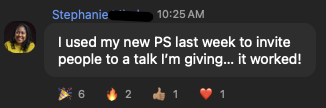
That’s the whole appeal. This one you set up once, in about ten minutes, and then it works on your behalf forever. While you’re asleep. While you’re doing client work. While you’re emailing someone about something completely unrelated.
Not just an introverted visibility move… also the laziest possible visibility move.
Which, for people like us, is the best kind.
This is Move 4 of six in Marketing for Introverts: 6 Visibility Moves That Don’t Require Performing.
What will yours say?
Join my weekly newsletter, Entrepreneur Like a Girl, and hit reply with your P.S. line. I’ll give you feedback.
Want these P.S. formulas as fill-in-the-blank templates, plus the other five moves? Grab my free Visibility Pack: six visibility moves you can do from your inbox, each with the exact words to send.
Get the free Visibility Pack →
Frequently asked questions
What should I put in my email signature?
Your name, business, website and the one or two contact details people actually use, plus a one-line P.S. that links to a single piece of proof: a reel, a case study, a press feature or a podcast episode.
What’s a good P.S. for an email signature?
One line that does one job: shows you’re legit, shows you understand who you’re talking to, or names the problem they have. Link the last few words to one short piece of content that proves it.
How long should an email signature P.S. be?
One line. If it needs a second sentence, it’s trying to do too much.
How often should I update my email signature?
Whenever you have better proof (a new feature, a stronger result, a new launch), and at least every few months.